
Best Tools For Event-Driven Logistics Coordination
Some of the tools that we consider the right event planning tools include Cvent, Whova, EventMobi, Slack, eShow, Asana, and many others. Planning an event is one thing, but coordinating the logistics behind it is a different ball game. If you’re searching for the right tools for event logistics coordination, you’re most likely looking for something that actually makes your planning process easier.
At Brick Dynamics, we know that successful event-driven logistics coordination depends on more than having the right software. For the past three years, we’ve helped businesses coordinate event logistics with reliable transportation, warehousing, field support, and on-site operational services that keep every moving part working together. Today, our network of more than 500 local experts supports businesses across 46+ markets, completing over 1,000 logistics jobs every day with precision and real-time visibility. If you’re looking for an experienced logistics partner to help simplify event operations and keep your next event running smoothly from planning through execution, contact us today to learn how we can support your team.
In this blog, we will review the top 20 best tools for event-driven logistics coordination. We will also guide you on what to look for when picking a tool and how to avoid common mistakes associated with using them.
Top 20 Best Tools for Event-Driven Logistics Coordination
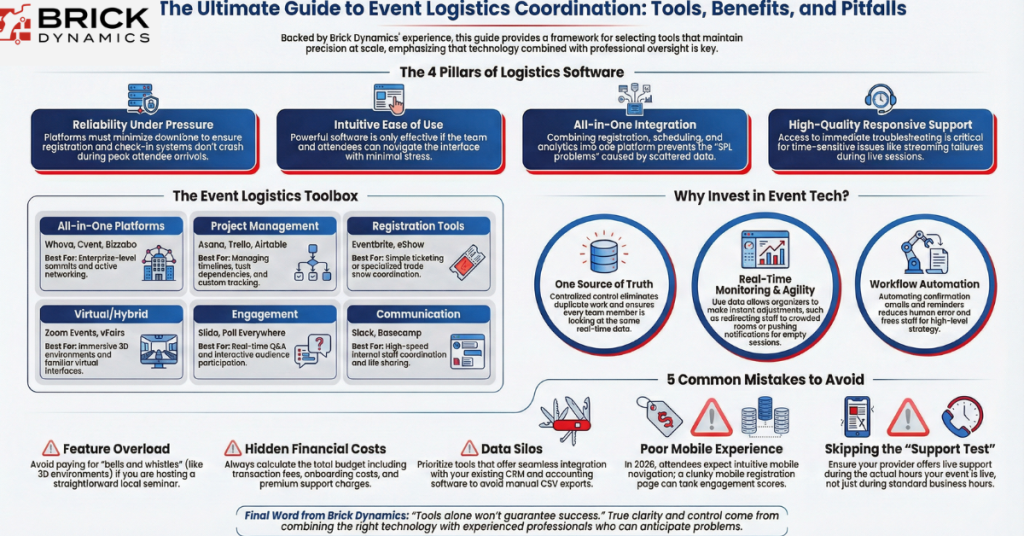
Event-driven logistics coordination is the process of using event planning software and project management tools to help manage vendor schedules, logistics, and other moving parts in real time. Event management tools are broadly grouped as all-in-one platforms and specialized software. The type of tool you choose is mostly dependent on your budget, the size of your crowd, and how much tech chaos your team can realistically juggle. To help you find the perfect fit for your workflow, here are the right event planning tools to keep your logistics on track.
Best All-in-One Event Management Platforms
All-in-one event platforms bring your entire event operation into one system. Instead of juggling separate tools for registration, ticketing, attendee communication, agendas, sponsors, analytics, and sometimes even virtual streaming, you manage everything from a single dashboard. But these platforms can be expensive, especially as your attendee count grows. That said, for complex events, the operational efficiency and reduced tech chaos often justify the investment.
1) Whova
If your main goal is to stop people from staring at their phones and start talking to each other, Whova is your best bet. It handles registration, agendas, sponsor promotion, surveys, and networking features like discussion boards and matchmaking. Whova is the gold standard for conferences that want to prioritize active networking over passive listening. But keep in mind that if you are a massive corporation needing hyper-complex financial reporting, you might find its backend a little too light for your needs.
2) Cvent
Cvent is one of the most established enterprise event platforms out there. If you are planning a massive global summit with a budget to match, this is the powerhouse you want in your corner. It covers registration, venue sourcing, marketing communications, on-site check-in, and advanced reporting, making it a strong choice for corporations managing multiple events throughout the year. Cvent is the right choice for enterprise-level teams that are big on reporting and compliance. We do not recommend this tool for small events such as local workshops because of its steep learning curve.
3) EventMobi
EventMobi focuses heavily on the mobile experience and is incredibly flexible for hybrid events where you have people sitting in the front row and others watching from their couches. EventMobi is a standout for planners who need a platform that looks and feels great on a smartphone screen. Despite the amazing user experience, we should mention that getting your branding and custom visuals right might require a little extra prep time.
4) Bizzabo
Bizzabo is perfect for marketing-driven organizations that need to prove the financial success of their events with hard data. It blends slick marketing tools with deep analytics, letting you track exactly how people are interacting with your content and what your ROI looks like. Expect a premium price tag for this premium experience, especially as your guest count grows.
Best Event Registration Tools
Sometimes you just need a reliable system that handles online registration without adding unnecessary complexity. Dedicated registration tools are ideal for smaller events, paid workshops, trade shows, or when you already have other systems handling logistics and marketing.
5) Eventbrite
Eventbrite is one of the most widely used online registration platforms. It makes it easy to create event pages, sell tickets, collect payments, and manage attendee lists without any technical setup. It’s especially useful for public-facing events where discoverability and simple checkout matter. The biggest advantage is simplicity and speed, but the tradeoff is the high transaction fees, which can add up quickly.
6) eShow
eShow is more tailored to trade shows and conferences. It’s a stronger fit for structured industry events where attendee and exhibitor coordination intersect. This specialization is particularly useful when you need to coordinate exhibit logistics for back-to-back trade shows, as the software helps manage the tight timelines that come with a busy event season. The limitation is that it’s more complex than lightweight ticketing tools and may be unnecessary for simple events.
Best Project Management/Task Management Platforms

Project management tools are ideal for managing timelines, assigning tasks, tracking progress, and coordinating multiple stakeholders. These tools are designed to focus on workflow and team collaboration, letting you stay organized.
7) Asana
Asana is a favorite for event teams because it is good at turning an intimidating to-do list into a manageable timeline. You can assign tasks, set dependencies, and see exactly where the bottlenecks are before they become actual problems. Asana is perfect for teams that need a highly structured way to track hundreds of moving parts across multiple departments. It is very flexible, but it can feel a little noisy or overwhelming if you don’t take the time to organize your project views from the very start.
8) Trello
Trello uses a simple card-and-board system to organize tasks visually. We recommend it for the visual thinkers in the house who love a good post-it note-style workflow. It uses a simple card-and-board system that lets you move tasks from “To-Do” to “Done” with a satisfying drag-and-drop motion. Trello is the right choice for small teams or straightforward projects that benefit from seeing the status of every task at a glance. It is super user-friendly, though things can get a bit messy if you try to squeeze a massive, multi-track conference onto a single board.
9) Planning Pod
Planning Pod is one of the few tools on this list built specifically for event planners. It bridges the gap between a standard project tracker and a dedicated event tool, saving you from having to customize general software to fit your needs. It’s great if you want a tool that’s already designed for the quirks of event planning. The only limitation is that it isn’t quite as versatile for tasks that don’t involve planning an event.
10) Airtable
Airtable is the ultimate tool for teams that want to build a customized tracking system from the ground up. With Airtable, you can create task lists, timelines, resource trackers, and custom views for different team members. Its flexibility makes it ideal for teams that want a lightweight project tracker but need advanced data organization. While it remains a powerful tool, the initial setup can be a bit of a time sink if you want a polished, automated workflow.
11) Project Manager
Project Manager is built for the technical leads who need traditional Gantt charts to stay on schedule. Many teams use this software alongside trade show logistics companies to ensure that the digital project plan and the physical equipment move in perfect sync. Admittedly, it’s a bit old school compared to the other tools we’ve mentioned so far. And as far as creativity goes, it might feel a bit stiff, but for pure logistics, it gets the job done. Project Manager is a solid pick for technical event leads who need to manage strict timelines and physical hardware resources.
Best Online Event Management Software
Online event management tools are designed specifically for virtual and hybrid experiences. Instead of piecing together video software and chat tools, they let you run everything through a centralized platform.
12) Zoom Events
Zoom Events takes the familiar Zoom interface and supercharges it for full virtual conferences and multi-session events. You can handle registration, ticketing, multiple sessions, networking lounges, and analytics all in one place. The lack of a learning curve for attendees makes Zoom Events the safest and most reliable bet for large-scale virtual conferences. While the pricing can feel a bit steep for a smaller gathering, the peace of mind that comes with a platform people actually know how to use is often worth the extra cost.
13) RingCentral Events
RingCentral Events is a solid platform that focuses on connecting the audience with the presenters through smooth Q&A, live polls, and interactive breakout sessions. It is ideal for virtual conferences that want to prioritize polished, interactive engagement over a passive viewing experience. It can feel a bit heavy for small-scale events, but the level of control and analytics is hard to beat for professional virtual productions.
14) vFairs
vFairs is the top pick for virtual-first events where sponsors and exhibitors need a high-impact way to show off their booths. This platform is the closest you can get to teleporting your remote attendees into the room. It uses immersive 3D environments and virtual exhibit halls to recreate that walking-the-floor feeling that most digital platforms miss. However, for purely in-person events, its capabilities may be more than you actually need.
Best Event Engagement Tools
Keeping attendees engaged is one of the trickiest parts of any event, whether virtual, hybrid, or in-person. Engagement tools help spark interaction, collect real-time feedback, and make sure your audience is actively participating instead of zoning out.
15) Slido
Consider Slido the ultimate icebreaker for any presentation. Slido allows you to effortlessly create live polls, Q&A sessions, and quizzes. Attendees can submit questions and vote, keeping discussions relevant and interactive. It is a fantastic way to get instant insights, though you will need a clear plan to stay organized if you are running it across a massive, multi-track conference.
16) Poll Everywhere
We recommend Poll Everywhere to presenters who want complete versatility in how they collect live responses from their audience. With it, you can turn any presentation into a two-way conversation. Participants respond via phones, laptops, or tablets, and results appear in real time. Just like any high-energy tool, it works well when you have a solid structure in place to manage the flow between different sessions.
Communication & Coordination Tools

When used correctly, these tools improve response time, clarity, and overall execution. However, they require structure to avoid becoming just another noisy channel.
17) BaseCamp
Basecamp focuses on communication and task management in one hub. It combines to-do lists, messaging, file sharing, and schedules to keep your team aligned. Its strength lies in its simplicity but the limitation is that it’s less feature-rich for complex timeline tracking or detailed resource management.
18) Marketo
Marketo is a massive asset for organizations that run high-volume events and need their marketing automation to do the heavy lifting. From email campaigns to personalized workflows, it keeps attendees informed and nurtures leads after the event. It offers in-depth analysis, but it can be a bit of an overkill if you are a smaller team or if your event doesn’t have a heavy focus on data-driven marketing.
19) Iterable
Iterable is another marketing automation platform built for multi-channel campaigns. If you want to reach your attendees wherever they are, whether that is via email, SMS, or in-app notifications, Iterable is your go-to tool. Just keep in mind that there is a bit of a learning curve, so you will want someone on your team who is comfortable navigating a more advanced automation platform.
20) Slack
Slack is an easy way to keep your entire event staff in sync during the high-pressure environment of a live show. By using dedicated channels for things like “Catering” or “AV Tech,” you can keep your internal conversations organized and lightning-fast. It is an absolute lifesaver for quick updates, but it does require some ground rules and clear channel structures to prevent the conversation from becoming a noisy distraction.
The right tool for event-driven logistics coordination depends on your budget, event size, and operational needs. Even though each platform has its own strengths, comparing the popular options helps make it easier to identify the right fit for your team. The table below highlights some event management software based on scalability, pricing, ideal use, and customer support.
| Tool | Ideal For | Pricing Model | Customer Support | Scalability | Free Trial/Demo |
|---|---|---|---|---|---|
| Whova | Conferences, corporate events, attendee engagement | Custom pricing | Email, live support, knowledge base | Medium to Large Events | Demo available |
| Cvent | Enterprise events and venue management | Custom enterprise pricing | 24/7 support, dedicated account managers | Large Enterprises | Demo available |
| EventMobi | Hybrid and virtual events | Custom pricing | Email, live chat, onboarding support | Small to Large Events | Demo available |
| Bizzabo | Marketing-driven events and analytics | Custom pricing | Customer success team, knowledge base | Medium to Enterprise | Demo available |
| Asana | Project management and event planning | Free & paid plans | Help center, community, premium support | Small to Enterprise Teams | Free plan available |
| Eventbrite | Ticket sales, registrations, community events | Pay per ticket/subscription | Help center, email support | Small to Medium Events | Free plan available |
4 Key Features to Look for in Event Logistics Tools

Choosing the wrong software can lead to expensive delays and unnecessary stress on your team. To avoid these pitfalls, be sure to first evaluate every tool based on these features:
- Reliability: Imagine your registration system crashing just as hundreds of attendees are trying to check in at the same time. Reliable platforms minimize downtime and errors, ensuring your event stays on schedule and your team isn’t scrambling to fix avoidable problems.
- Ease of Use: Even the most powerful software is useless if your team or attendees can’t figure out how to use it. A user-friendly interface keeps operations smooth and stress levels low.
- All-in-One Capabilities: Tools that combine registration, scheduling, communication, and analytics save you from juggling multiple apps and spreadsheets. This kind of integration is essential because it helps you avoid the common 3PL problems that usually pop up when data is scattered across too many disconnected systems. Having everything in one platform keeps your workflow streamlined and reduces the risk of errors.
- High-Quality Customer Support: Not to burst your bubble, but even the right software can run into issues. Picture a virtual session about to start, and the streaming feature suddenly fails. Without a responsive support team, you’d be stuck trying to troubleshoot while attendees wait. Great support ensures problems are solved fast, protecting your team from unnecessary stress.
How to Choose the Right Event Management Software
Choosing the right event management software is not about buying the platform with the most features. It’s about finding a solution that fits your event planning process, supports your event team, and makes event logistics easier from start to finish. The right event planning tools should help you manage vendors, schedules, attendee communication, task management, and post-event reporting without forcing you to juggle separate tools. We’ve found that businesses get better results when they focus on their biggest operational needs before comparing software. The S.M.A.R.T. Framework will help you choose the right event management software for your next event.
S – Start with Your Event Needs
Every event is different, so don’t choose an event management platform until you understand what your team needs. Think about your event size, budget, attendee management, vendor management, event registration, venue management, logistics management, and whether you’re planning in-person, virtual, or hybrid events. You should also decide if you need an all-in-one platform or event-specific tools for project management, attendee engagement, and post-event reporting. According to the U.S. Bureau of Labor Statistics, employment for meeting, convention, and event planners is projected to grow 5% from 2024 to 2034, with an average of 15,500 job openings every year, showing that demand for skilled event planning continues to grow. As the industry grows, choosing software that supports your entire event lifecycle becomes even more important.
M – Match the Software to Your Workflow
The right event management software should fit the way your team already works instead of forcing everyone to change their process. Look for event planning software that connects with your customer relationship management (CRM) system, project management software, marketing automation platform, and other business tools. It should also support workflow automation, attendee communication, vendor management, task management, and event data from one place so your team isn’t juggling separate tools. We’ve seen businesses spend more time updating different systems than planning the event because they picked software that didn’t fit their workflow. Thomas O’Brien says, “The best software doesn’t make your team work harder. It removes unnecessary steps, so your team can focus on delivering a successful event.”
A – Assess Reliability Before You Commit
Don’t let a polished sales demo make the decision for you. Test how the platform performs during event registration, ticket sales, attendee tracking, push notifications, team communication, and real-time updates before signing a contract. It should also be easy for your event teams to use under pressure, especially during busy event days. According to the Project Management Institute’s Pulse of the Profession 2024 report, organizations reported an average project performance rate of 73.8%, and the research found that giving teams the right tools, flexibility, and support helps improve project outcomes. Reliable software should help your team stay organized instead of creating more work.
R – Review Long-Term Value
Don’t choose software just because it works for your next event. Think about whether it can support multiple events, larger corporate events, association events, and future business growth without forcing you to switch platforms later. Look for advanced features like attendee networking, event engagement, vendor management, logistics management, post-event reporting, and analytics that will continue to add value as your needs grow. T.J. Hennessey says, “Good event management software helps you run one event. Great software helps you improve every event because it gives you better visibility and better data.” Choosing a scalable platform today can save your team time, money, and unnecessary disruptions later.
T – Test It with Your Team
Before making a final decision, let the people who will use the software every day try it first. Ask your event planners, logistics team, project managers, and vendors to test event registration, attendee engagement features, project management tools, communication tools, and reporting dashboards. Their feedback will quickly show whether the platform is easy to use or whether it will slow your team down. From our experience, the software that looks impressive during a demo isn’t always the easiest platform to use during a live event. Thomas O’Brien says, “The people using the software every day are the best people to tell you if it’s the right fit. Their feedback is just as important as the feature list.”
What Are The Benefits of Using Event Management Tools?
Event management tools act as the ultimate digital assistant, taking the heavy lifting out of repetitive tasks so you can focus on the big picture. By centralizing every detail in one place, these platforms help event organizers stay organized, connected, and significantly less stressed throughout the entire planning process.
Centralized Control
Having one source of truth ensures the whole team is looking at the same data, which completely eliminates the risk of missed updates or duplicate work. Without this, it’s far too easy for things to fall through the cracks.
Seamless Attendee Experience
A smooth attendee journey starts long before the event begins. A seamless experience not only reduces complaints but also increases satisfaction and makes your event look professionally run.
Actionable Real-Time Monitoring
One of the best perks of modern event tech is that you don’t have to wait until the doors close to see how you’re doing. You get a live look at registration numbers and session engagement as it happens. Real-time monitoring allows you to make smart adjustments on the fly, like redirecting staff to a crowded room or sending a quick push notification to fill an empty session.
Improved Team Coordination
When roles, timelines, and responsibilities are clearly visible, teams operate with far fewer surprises. Without these programs, communication gaps appear, deadlines get missed, and small issues escalate into last-minute problems. Strong coordination tools create accountability and keep everyone moving in the same direction.
Automation
Nobody enjoys sending out five hundred individual confirmation emails or manual reminders. By automating your workflows, you drastically reduce the chance of human error and free up your team to focus on the high-level details that actually matter.
Common Mistakes to Avoid When Choosing an Event Management Software
Choosing the wrong software can turn a great project into a logistical headache if you aren’t careful. To keep your event planning process smooth, keep an eye out for these frequent slip-ups that often catch planners off guard.
1. Buying More Features Than You Actually Need
It is tempting to go for the platform that has the longest list of “bells and whistles,” but more isn’t always better. If you are hosting a straightforward local seminar, you don’t need a system built for a global 3D virtual summit. Paying for complex features you will never use just adds unnecessary clutter and makes the learning curve much steeper for your team. Before you sign any contracts, make a list of your “must-haves” and stick to them.
2. Ignoring the Hidden Costs
The price tag you see on the website is rarely the final number. Many planners get caught off guard by transaction fees, onboarding costs, or extra charges for “premium” support. Always calculate the total cost based on your expected attendee count and ticket price to avoid any nasty surprises in your budget. If a platform isn’t transparent about its fee structure from the jump, that is usually a red flag.
3. Forgetting About Integration
Your event software shouldn’t live on an island. If it doesn’t talk to your CRM, your email marketing tool, or your accounting software, you are going to spend half your life manually exporting and importing CSV files. Prioritize tools that offer seamless integrations with the apps your team already uses every day. If the data doesn’t flow easily between systems, you are essentially creating more work for yourself instead of less.
4. Overlooking the Attendee Mobile Experience
In 2026, your attendees expect to do everything from their phones. If the registration page is clunky on mobile or the event app is a pain to navigate, people will simply stop using it. Always test the platform from a mobile perspective to ensure the interface is clean, fast, and intuitive for a user on the move. A bad mobile experience can quickly tank your engagement scores, no matter how great your speakers are.
5. Skipping the Support Test
Most events have a tech emergency at some point, and that is not the time you want to find out that your software provider only answers emails during business hours in a different time zone. Before committing, check the support levels to see if they offer live chat or a dedicated account manager for the days your event is actually live. You aren’t just buying software; you are buying a partnership, so make sure they have your back when things get stressful.
Do You Have The Right Tools Behind Your Event Logistics?
Event logistics has a way of looking simple on paper and becoming complicated the moment things start moving. But with the right tools, it becomes easier and faster to coordinate your team. Remember, tools alone won’t guarantee you a successful event. What really makes the difference is having experienced professionals who know how to use those systems to anticipate problems and keep everything on track.
At Brick Dynamics, we combine proven logistics processes with the right technology to coordinate timelines, shipments, and on-site execution without unnecessary chaos. If you want your next event handled with clarity and control, our team is ready to step in and make sure the logistics side runs exactly as it should. Speak with one of our experts today!
FAQs
These insights will help you decide which platforms fit your specific needs and how to get the most out of your tech stack. Have a question that isn’t here? Reach out and a member of our team will be happy to help.
What Are The Top Tools For Event-Driven Logistics Coordination?
Top-rated options like Whova and Cvent are favorites because they offer a complete, all-in-one platforms that manage everything from registration to attendee networking. For those who need to handle complex project timelines, tools like Asana and Airtable provide powerful tracking and data organization to keep every moving part in sync.
How Do I Choose The Right Tool For Event-Driven Logistics Coordination?
The best way to choose a tool is by identifying the specific needs of your event, such as whether you require deep financial reporting or just a simple way to check in guests. If you are running a large-scale conference, an all-in-one platform is usually the best bet, but smaller workshops might only need a specialized registration tool. Always pick a tool that aligns with your team’s technical comfort level and your total budget to ensure it actually helps rather than hinders your workflow.
Are There Any Free Tools Available For Event-Driven Logistics Coordination?
Yes, there are. Most of the platforms on our list follow a “freemium” model, meaning you can start for free and only pay for a subscription when you need more advanced features or a higher attendee capacity. This allows you to test the software thoroughly before committing to a long-term financial investment.
What Are The Key Features To Look For In Event-Driven Logistics Coordination Tools?
You should prioritize reliability and ease of use to ensure your team can navigate the software even under high-pressure situations. It is also important to look for all-in-one capabilities that centralize your data and high-quality customer support that is available when your event is actually live. These four features work together to reduce technical chaos and protect your event from avoidable logistical failures.
What Are the 5 C’s of Event Planning?
The 5 C’s of event planning are Concept, Coordination, Control, Culmination, and Closeout. They guide event planners through every stage of the event planning process, from developing the initial idea to evaluating results after the event. Following these five steps helps teams stay organized and deliver a successful event.
What Are the 5 P’s of Event Planning?
The 5 P’s of event planning are Purpose, People, Place, Program, and Promotion. They help event organizers define their goals, identify their audience, choose the right venue, plan activities, and market the event effectively. When combined with the right event management software, these principles make planning and logistics much easier.
What Are the 7 P’s of Event Management?
The 7 P’s of event management are Product, Price, Place, Promotion, People, Process, and Physical Evidence. These principles help event professionals create memorable experiences while managing budgets, vendors, attendee engagement, and event logistics. They also provide a useful framework for improving the entire event lifecycle.