
Best Free Inventory Management Software
Businesses are increasingly using free inventory management software such as Zoho Inventory, Sortly, Stockpile, and Odoo to improve inventory accuracy and streamline daily operations. These free inventory tools help small businesses reduce manual tracking, improve real-time visibility, and manage inventory more efficiently across multiple locations. Features such as barcode scanning, low-stock alerts, purchase orders, and multi-location tracking also help businesses support operational efficiency and future growth.
At Brick Dynamics, we help businesses improve inventory management and warehouse operations through smarter software selection, inventory tracking strategies, and operational workflow optimization. Our approach focuses on helping businesses choose inventory systems that reduce manual errors, improve cash flow visibility, and support long-term operational scalability. Contact us today to build smarter inventory management strategies that support more efficient business operations and sustainable growth.
This blog explores the best free inventory management software options, the features businesses should prioritize, and the strategies that support long-term operational efficiency and scalability.
What Are Some Key Free Inventory Management Software Options?

Different free inventory management software options offer different features, integrations, and scalability levels depending on business size and operational needs. Some free inventory systems focus heavily on barcode scanning and inventory tracking, while others prioritize accounting software integration, multi-location management, or ecommerce functionality. In our experience, the best free inventory management software usually balances usability, operational flexibility, and a clear upgrade path for future growth. Businesses should also evaluate item limits, user restrictions, and integration capabilities before choosing a free inventory tool. The following software options are among the most commonly used free inventory management systems for small businesses and growing operations.
1. Zoho Inventory
Zoho Inventory is one of the most widely used free inventory management software options for small businesses managing multiple sales channels and inventory locations. The platform includes features such as barcode scanning, purchase orders, sales orders, shipping label generation, and low-stock alerts. Zoho Inventory also integrates with accounting software, ecommerce platforms, and shipping carriers to improve operational efficiency. Its free plan works well for businesses needing real-time inventory visibility without investing in enterprise software immediately. However, some advanced features and higher-order volumes require upgrading to paid tiers.
2. Sortly
Sortly focuses on visual inventory management and simple inventory tracking for businesses that want an easier alternative to manual tracking systems or spreadsheets. The platform supports barcode scanning, mobile access, inventory counts, and item management through a user-friendly interface. Many businesses choose Sortly because it requires limited technical expertise and supports faster inventory updates across different locations. In our experience, Sortly works best for businesses prioritizing simplicity and operational visibility over highly advanced inventory features. However, some free versions include storage limitations and restricted multi-user access.
3. Stockpile
Stockpile is a free inventory management system designed for small businesses looking for straightforward inventory tracking without complex setup requirements. The platform supports inventory counts, purchase history tracking, and basic inventory management workflows across different product categories. Businesses often use Stockpile to replace Google Sheets or other manual inventory tracking methods. The software also supports multiple users, which helps smaller teams manage inventory collaboratively. However, businesses requiring advanced reporting or extensive integrations may eventually outgrow the platform’s free features.
4. Odoo Inventory
Odoo Inventory offers open-source inventory management tools that support more customizable inventory workflows and operational processes. The platform includes features such as barcode scanning, real-time inventory tracking, smart replenishment strategies, and multi-location inventory management. Businesses often choose Odoo because it integrates with broader business operations, including accounting, purchasing, and project management tools. Odoo can work well for growing businesses that need operational flexibility and future scalability. However, setup and ongoing maintenance may require more technical expertise than simpler free inventory software options.
5. Square Inventory
Square Inventory works well for retail businesses already using Square’s point-of-sale ecosystem for payments and sales tracking. The software helps businesses manage inventory counts, monitor low-stock alerts, and track inventory updates automatically during transactions. Integration with Square’s broader business tools also helps businesses maintain stronger inventory accuracy across physical and digital sales channels. In many cases, Square Inventory works best for businesses prioritizing operational simplicity and centralized inventory management. However, businesses managing multiple warehouses or advanced inventory workflows may require more advanced systems later.
How the Top Free Inventory Management Software Options Compare
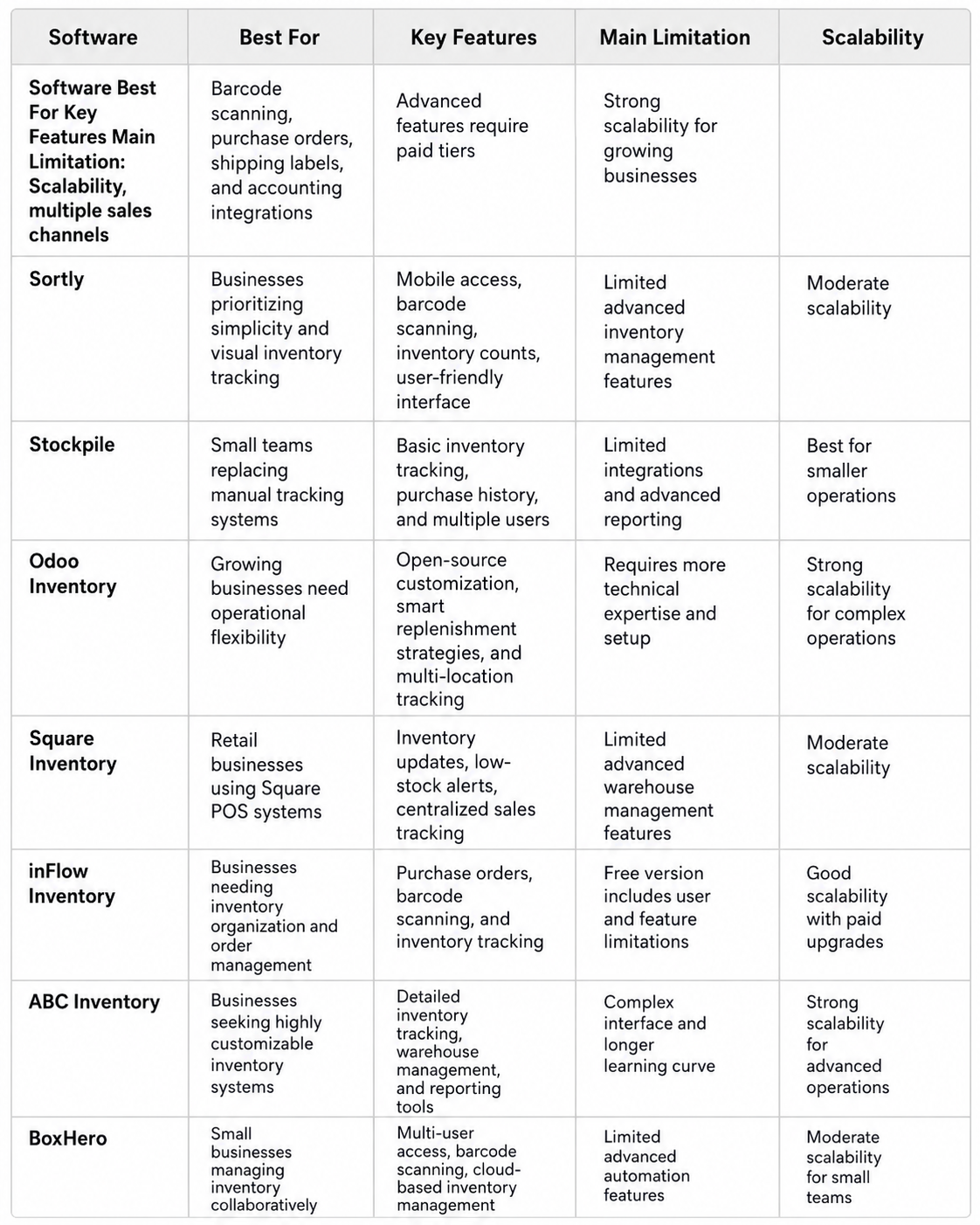
Different free inventory management software options support different business operations, inventory workflows, and scalability requirements. Some inventory systems focus on simplicity and inventory tracking, while others provide broader operational integrations and advanced inventory management features. Businesses should compare inventory tools based on operational needs, future growth plans, and workflow complexity instead of choosing software based only on free access. In our experience, the best inventory software usually combines usability, operational flexibility, and a practical upgrade path for growing businesses. The comparison below highlights how the most common free inventory management software options differ across key operational areas.
Disclaimer: Software features, free plans, item limits, and integration capabilities may change over time. Businesses should review each provider’s current offerings and pricing structure before making operational or purchasing decisions.
What Makes Free Inventory Management Software Valuable?
Free inventory management software helps businesses improve inventory accuracy and operational efficiency without committing to expensive enterprise software or long-term paid subscriptions. Many growing businesses begin with free inventory tools because they provide essential inventory management features while reducing upfront operational costs. These systems also help businesses replace manual tracking methods that often lead to human error, inaccurate inventory counts, and delayed inventory updates. In our experience, businesses usually achieve better operational visibility when they move away from spreadsheets and disconnected inventory processes. Even basic inventory systems can significantly improve day-to-day inventory management workflows.
One major advantage of free inventory management systems is their ability to improve real-time inventory tracking across different sales channels and business operations. Features such as barcode scanning, low-stock alerts, purchase orders, and sales orders help businesses manage inventory more efficiently while reducing manual errors. Real-time visibility also helps businesses make better purchasing decisions and respond faster to inventory shortages or changing customer demand. According to the National Retail Federation, inventory shrink represented 1.6% of retail sales in 2022, costing retailers billions in operational losses. Strong inventory systems help businesses reduce these operational risks while improving inventory accuracy.
Free inventory software also gives small businesses access to operational tools that were once typically reserved for larger companies with bigger technology budgets. Many free plans now include mobile access, multi-user access, multi-location tracking, and accounting software integrations that support more efficient business operations. Some free inventory management software options also integrate with shipping carriers, ecommerce platforms, and existing business tools to improve workflow efficiency. As Thomas O’Brien explains, “Operational visibility becomes more valuable as businesses grow and inventory complexity increases.” Strong software integration often helps businesses scale more efficiently over time.
Another important advantage is the flexibility that many free inventory management systems provide for growing businesses. Businesses can test inventory software, improve internal inventory processes, and identify operational gaps before committing to a paid system or advanced features. This approach helps businesses avoid unnecessary software costs while creating a clearer upgrade path for future growth. However, businesses should still evaluate free versions carefully because some free plans include item limits, limited integrations, or restrictions on multiple users. Understanding these limitations early helps businesses choose inventory tools that support long-term operational scalability.
How Businesses Can Choose the Right Inventory Management Software

Choosing the right inventory management software requires more than comparing free plans or looking for the lowest operational cost. Businesses should evaluate how inventory systems support inventory accuracy, operational efficiency, future growth, and day-to-day workflow management. In our experience, the best inventory software balances usability, scalability, and integration flexibility without creating unnecessary operational complexity. Businesses should also consider how inventory management systems fit within their existing tech stack and long-term operational goals. The S.T.O.C.K Framework helps businesses evaluate inventory software more strategically while avoiding common operational limitations.
S- Scalability
Inventory management software should support business growth without forcing major workflow disruptions as operations expand. Many businesses begin with free inventory tools but eventually require support for multiple warehouses, larger inventory counts, and more advanced operational features. Scalable inventory systems help businesses maintain inventory accuracy and operational visibility as order volume increases. Businesses should also evaluate whether the software provides a clear upgrade path into paid tiers or enterprise software when operational needs evolve. Strong scalability helps reduce future migration challenges and operational downtime.
T- Tracking Accuracy
Inventory tracking accuracy plays a major role in inventory management efficiency and purchasing decisions. Features such as barcode scanning, real-time tracking, low-stock alerts, and automated inventory updates help businesses reduce manual errors and improve operational visibility. Businesses relying heavily on manual tracking systems often experience inconsistent inventory counts and delayed inventory updates. According to the National Retail Federation, inventory inaccuracies continue contributing to significant operational losses through overstocks and out-of-stock issues. Strong inventory tracking tools help businesses improve inventory accuracy and operational control.
O- Operational Compatibility
Inventory management systems should integrate smoothly with accounting software, ecommerce platforms, shipping carriers, and other business tools already supporting daily operations. Some free inventory software options provide limited integrations, which can create disconnected workflows and operational inefficiencies. In our experience, businesses achieve better operational efficiency when inventory systems support centralized inventory updates and real-time visibility across multiple sales channels. Compatibility also becomes increasingly important for businesses managing multiple locations or more complex inventory processes. Strong operational alignment helps businesses scale more efficiently over time.
C- Cost Efficiency
Free inventory management software can reduce upfront operational costs, but businesses should still evaluate long-term software expenses carefully. Some free plans include item limits, restricted users, or limited advanced features that eventually require upgrading to paid subscriptions. Businesses should consider whether free versions provide enough operational value before future upgrade costs become necessary. As Thomas O’Brien explains, “The lowest software cost does not always create the strongest operational value.” Strong cost efficiency depends on balancing software functionality with operational needs and future scalability.
K- Knowledge and Usability
Inventory software should remain easy for teams to use without requiring extensive technical expertise or complicated onboarding processes. User-friendly inventory systems often improve adoption rates and reduce operational mistakes caused by inconsistent system usage. Mobile access, simplified dashboards, and intuitive inventory tools also help businesses manage inventory more efficiently across daily workflows. In many cases, businesses achieve stronger operational consistency when software remains simple enough for multiple users to manage confidently. Strong usability also reduces training time and ongoing operational frustration.
Common Limitations of Free Inventory Management Software
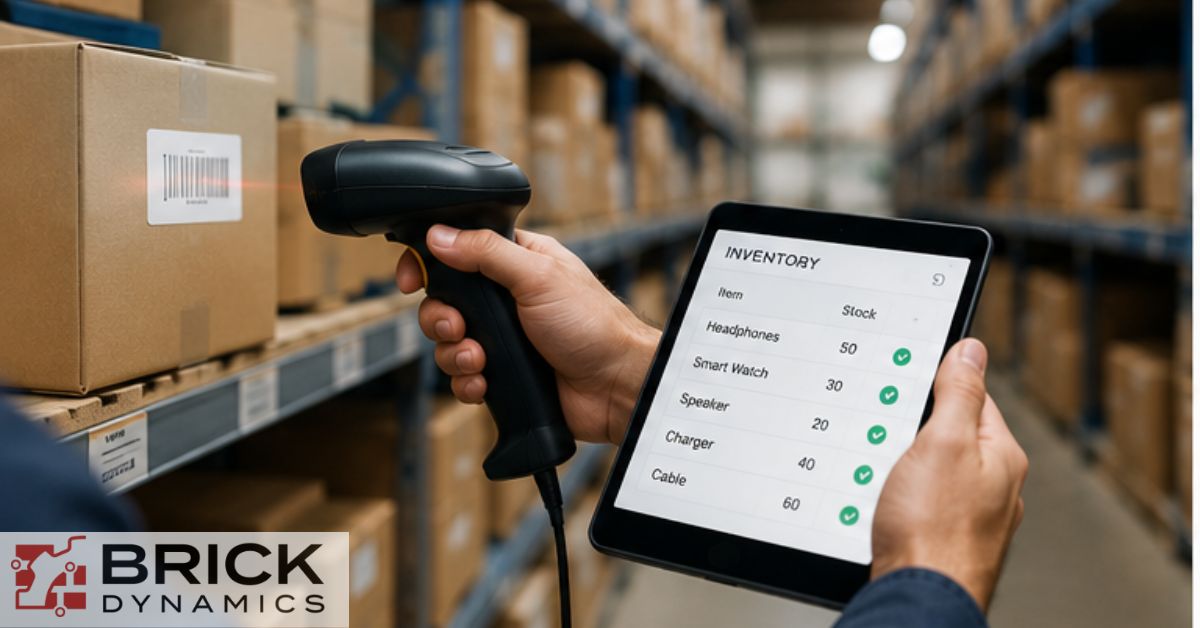
Free inventory management software can improve operational efficiency and inventory visibility, but many free plans include limitations that businesses should evaluate carefully before implementation. Some free inventory systems work well for basic inventory tracking, while others become difficult to manage as inventory complexity and operational demands increase. In our experience, businesses often encounter challenges when free inventory tools no longer support growing order volumes, multiple warehouses, or advanced reporting needs. Understanding these limitations early helps businesses avoid operational disruptions and choose inventory management software with a clearer long-term upgrade path. Free inventory software works best when businesses align software capabilities with actual operational requirements instead of focusing only on cost savings.
One common limitation involves item limits, restricted users, and limited multi-location functionality. Many free inventory management systems only support one user, limited inventory counts, or restricted tracking across multiple locations. These restrictions can create workflow bottlenecks as businesses grow and inventory operations become more complex. According to the U.S. Small Business Administration, poor inventory management remains one of the most common operational challenges affecting small business cash flow and scalability. Businesses with expanding operations often require more advanced inventory systems to maintain operational accuracy and real-time visibility.
Limited integrations also create operational challenges for businesses managing multiple sales channels, shipping carriers, or accounting software platforms. Some free inventory software options provide only basic integrations, which can force businesses to rely on manual updates and disconnected workflows. This often increases the risk of human error, delayed inventory updates, and inconsistent inventory data across business operations. As Thomas O’Brien explains, “Disconnected inventory systems create operational blind spots that become more expensive as businesses scale.” Strong software integration becomes increasingly important as operational complexity grows.
Another common issue involves limited automation and restricted access to advanced inventory management features. Some free plans exclude smart replenishment strategies, advanced inventory valuation tools, custom reporting, or automated purchase order management. Businesses may also encounter upgrade pressure once inventory volume, multiple users, or operational requirements exceed free-tier limitations. In many cases, free inventory tools work best as temporary operational solutions rather than permanent inventory systems for growing businesses. Businesses planning for future growth should evaluate whether the software provides a practical transition into paid tiers or more advanced inventory management solutions later.
Ready to Choose Inventory Software That Supports Long-Term Growth?
Free inventory management software can help businesses improve inventory accuracy, reduce manual errors, and streamline operational workflows without major upfront software costs. Businesses should prioritize inventory systems that support real-time visibility, operational scalability, and stronger inventory tracking across multiple sales channels and locations. Features such as barcode scanning, low-stock alerts, purchase orders, and software integrations also play an important role in long-term operational efficiency. However, businesses should carefully evaluate item limits, limited integrations, and scalability restrictions before relying heavily on free inventory management systems. What makes this guide different is its focus on practical software comparisons, operational limitations, and strategic inventory management considerations that support stronger business operations and future growth.
At Brick Dynamics, we help businesses choose inventory management software that improves operational visibility, supports future growth, and integrates effectively with existing business operations. Connect with our team to build smarter inventory management strategies that support long-term operational efficiency and scalability.
Frequently Asked Questions
Here are quick answers to common questions about free inventory management software and operational inventory tracking.
What Features Should Businesses Look for in Free Inventory Management Software?
Businesses should prioritize features such as real-time inventory tracking, barcode scanning, customizable reporting, and integrations with accounting software or e-commerce platforms. Mobile access, low-stock alerts, and multi-location tracking also support stronger operational efficiency.
Do Free Inventory Management Systems Limit Products or Transactions?
Some free inventory management software options include restrictions on inventory counts, transactions, or multiple users. Businesses should review item limits and free-tier restrictions carefully before choosing inventory software.
Can Free Inventory Software Support Multiple Locations or Warehouses?
Some free inventory systems support multi-location tracking and warehouse management features, while others provide only basic inventory functionality. Businesses managing multiple locations should evaluate scalability and operational compatibility before implementation.
How Secure Is Free Inventory Management Software?
Inventory management software should support secure user access, data protection, and reliable system backups to reduce operational risk. Businesses should also evaluate software security practices and integration reliability before adopting free inventory tools.
Do Free Inventory Management Systems Provide Support or Training Resources?
Some free inventory software providers offer onboarding resources, customer support, and knowledge libraries to help businesses improve software adoption. However, support availability often varies depending on the provider and free-plan limitations.